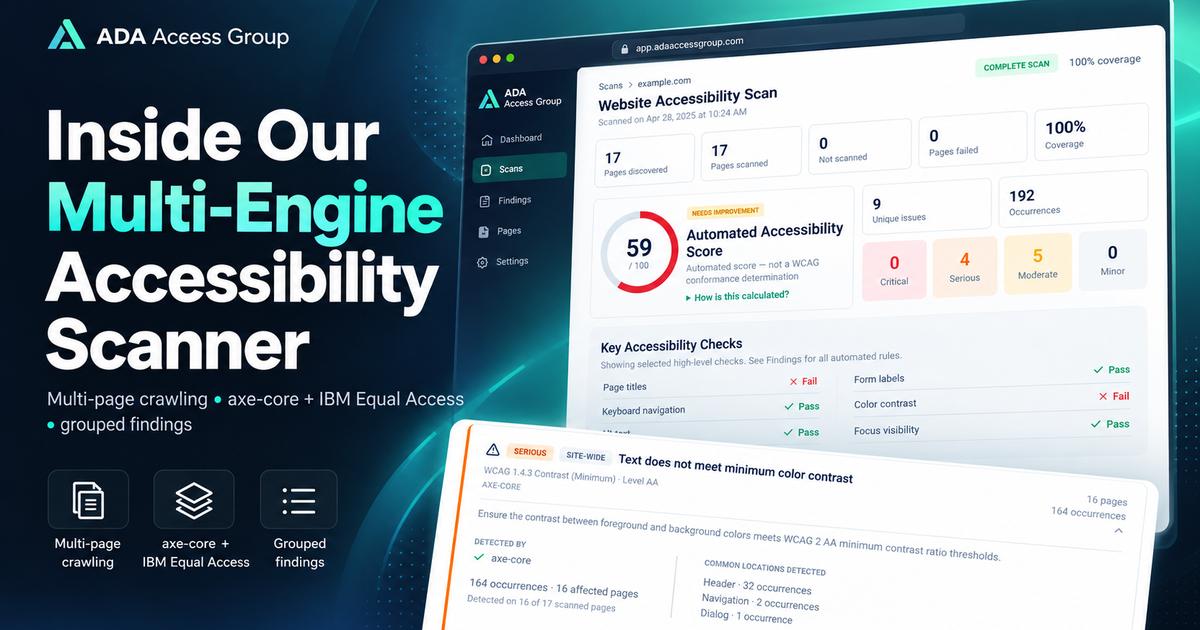
Most website accessibility scanners answer a narrow question: what machine-detectable problems exist on the page that is open right now? That can be useful, but a real website is rarely one page. Navigation, forms, product templates, service pages, legal pages, booking flows, and localized content can all behave differently.
That is why ADA Access Group rebuilt its automated scanner around a broader goal: discover multiple pages, render them in a real browser, run more than one accessibility rule engine on the same page state, group repeated defects, and clearly separate confirmed automated findings from items that still require human review.
The result is still an automated accessibility scan, not a WCAG conformance determination and not a substitute for a manual audit. But it gives website owners and development teams a much clearer first picture of where repeated accessibility problems exist across a site.
Why a one-page accessibility scan can miss the bigger picture
A homepage can pass a particular automated check while another template fails it. A contact form may have labeling problems that do not exist on a service page. A navigation component can introduce the same contrast or accessible-name problem across dozens of URLs. If only one page is tested, those patterns remain hidden.
A multi-page scan is useful because it can answer questions such as:
- Is the same problem repeated across many pages?
- Is an issue site-wide or isolated to one template?
- Which discovered pages were actually scanned?
- Did the scan reach its page limit before covering every discovered URL?
- How many unique problems exist versus how many total occurrences were found?
That distinction matters. Two hundred occurrences of the same low-contrast component should not automatically be presented as two hundred unrelated accessibility problems.
How the ADA Access Group scanner works
1. It discovers pages across the website
The scanner starts from the submitted website and attempts to discover internal URLs through the site's sitemap and internal links. URLs are normalized so obvious duplicates, tracking parameters, and fragments do not inflate the page count.
The report then separates pages discovered from pages scanned. If the configured page limit is reached, the report says so rather than implying that the entire website was evaluated.
2. It renders each page in a real browser
Modern websites often build important interface content with JavaScript. Testing only downloaded HTML can miss the interface that a user actually receives.
Our scanner loads pages in a browser environment and evaluates the rendered DOM. This is especially important for navigation, dynamically generated content, form controls, and modern JavaScript frameworks.
3. It runs axe-core and IBM Equal Access on the same rendered page
The current scanner uses axe-core and IBM Equal Access Accessibility Checker as automated rule engines. Both run against the same rendered page instead of independently crawling the site in separate browser sessions.
axe-core supports automated rules associated with WCAG 2.0, 2.1, and 2.2, including A and AA criteria, as well as best-practice rules. Deque also returns incomplete results when a condition cannot be determined with enough certainty and requires review.
IBM Equal Access provides accessibility rules and dedicated rulesets for WCAG 2.2 A/AA, WCAG 2.1 A/AA, and WCAG 2.0 A/AA. It also distinguishes confirmed violations from potential violations and manual-review conditions.
Using two engines does not mean every result is counted twice. Their raw results are normalized before they reach the public report.
4. Overlapping results are normalized into canonical findings
Different testing engines can describe the same underlying accessibility problem with different rule IDs or wording. If both engines identify the same semantic failure on the same kind of element, the scanner can map those raw results to a single ADA Access Group finding.
This prevents a report from becoming artificially larger simply because two tools detected the same defect.
When a finding is supported by one or more engines, the report can show which engine detected it. That information is useful evidence, but it should not be confused with a legal or manual confirmation of conformance.
5. Repeated occurrences are grouped
Site-wide components create noise in ordinary scanner exports. For example, a contrast defect in a shared header may appear on every page. Instead of listing the same defect dozens of times as separate unique issues, the report distinguishes:
- Unique issues — the distinct accessibility problems found;
- Occurrences — how many individual elements triggered those problems;
- Affected pages — how broadly each problem appears across the scanned site.
The report can also classify scope, such as site-wide or page-specific, and group similar element patterns so developers can identify repeated component-level defects faster.
6. It separates failures from items that need review
Not every accessibility question can be answered automatically. A scanner may be able to determine that an image has an alt attribute, but it cannot always determine whether the alternative text communicates the image's real purpose in context.
That is why the report separates:
- Accessibility Issues — automated failures detected by the rule engines;
- Needs Review — conditions where automation cannot make a reliable final determination;
- Passed Audits — checks that passed within the automated test scope;
- Not Applicable — rules that did not apply to the tested content.
This is more useful than forcing every rule into a simple pass/fail bucket.
What an automated accessibility scanner can find
Automated rules are particularly effective at finding deterministic code and presentation patterns. Depending on the page and applicable rules, examples can include:
- insufficient text color contrast;
- links or controls without discernible accessible names;
- missing page titles or document language;
- certain missing form labels;
- invalid or problematic ARIA usage;
- landmark and heading-structure issues;
- some image alternative-text failures;
- duplicate or invalid structural relationships;
- best-practice issues that can affect navigation and semantics.
Automation is valuable because these rules can be applied consistently across many pages much faster than a person could inspect every repeated component manually.
What the scanner still cannot determine
No automated scanner can determine full website accessibility by itself. W3C guidance is explicit that evaluation tools can assist with accessibility evaluation, but human judgment is required for aspects that cannot be checked automatically.
Examples that often require manual testing include:
- whether keyboard focus follows a logical sequence;
- whether a modal moves and returns focus correctly;
- whether screen-reader announcements are understandable at the right time;
- whether link and button names make sense in context;
- whether alternative text accurately communicates an image's purpose;
- whether form validation and error recovery are understandable;
- whether a user can complete a real checkout, booking, account, or contact workflow;
- whether the reading order and interaction experience make sense to an assistive-technology user.
This is why our reports label the automated score as an Automated Accessibility Score and state that it is not a WCAG conformance determination.
How to read a multi-page accessibility report
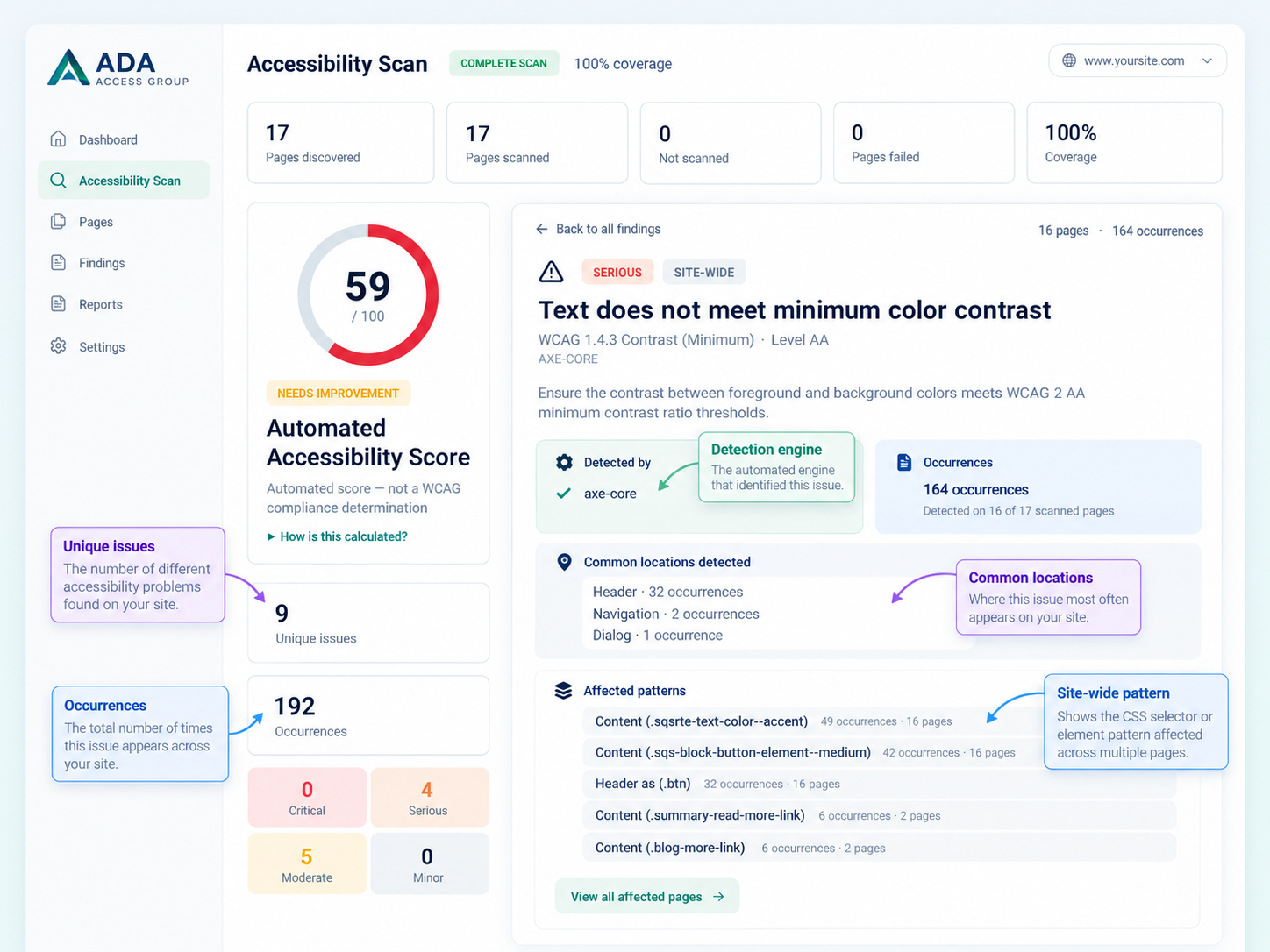 Example report view: grouped findings help distinguish unique accessibility issues from repeated occurrences across multiple pages.
Example: one unique issue can have many occurrences
In the example report above, one color-contrast problem appears 164 times across 16 scanned pages. The scanner still treats it as one unique accessibility issue, while preserving every occurrence and the pages where it appears.
This matters because a repeated defect in a shared header, button style, or content component often needs one systemic code fix rather than 164 separate fixes. The report also surfaces common locations and affected patterns so a developer can quickly see whether the problem is site-wide, component-level, or limited to a smaller group of pages.
A useful report should help you separate scale from severity. Start with four questions:
How much of the discovered site was scanned?
Look at pages discovered, pages scanned, pages not scanned, failed pages, and coverage. A report showing 100% coverage means 100% of the pages the crawler discovered were scanned; it does not guarantee that every possible private, authenticated, orphaned, or undiscoverable URL on the website was found.
How many unique problems exist?
Unique findings are usually more useful for planning remediation than raw occurrence counts. One broken shared component can generate hundreds of element-level failures while requiring one systemic code fix.
How widespread is each problem?
A finding present on nearly every scanned page should usually be investigated as a shared template or component problem. A finding present on one or two pages may require page-specific remediation.
Which findings still need a person?
The Needs Review section is important. It tells you where automation reached its limit instead of silently turning uncertainty into a pass.
Why we use more than one automated rule engine
axe-core and IBM Equal Access are not identical. Their rule sets, messages, and review classifications differ. Running both on the same rendered page can expose useful differences in automated coverage and can provide more evidence about repeated technical problems.
However, the goal is not to maximize the raw number of errors. The goal is to produce a cleaner list of actionable accessibility findings. That is why the scanner normalizes overlapping results before calculating public totals.
We also keep automated recommendations and review-only conditions separate from confirmed failures wherever possible. A best-practice recommendation should not be presented as though it were automatically a WCAG failure.
Where the automated scan fits in a real accessibility program
The scanner is designed as a fast first layer, not the final step.
- Run the automated scan to find repeated machine-detectable issues across the site.
- Fix obvious systemic defects such as repeated contrast, labeling, language, title, or semantic problems.
- Review Needs Review items that cannot be decided reliably by software.
- Test key user journeys manually with keyboard and screen readers.
- Retest after remediation to confirm that fixes did not create regressions.
For organizations that need a scoped accessibility evaluation rather than an automated baseline, our Website Accessibility Audit combines automated checks with manual keyboard and screen-reader testing of important templates and flows.
If you want to see the machine-detectable issues on your own website first, you can run the free automated accessibility scan from the ADA Access Group homepage.
Automated scanning should be transparent about its limits
A scanner is most useful when it tells you both what it found and what it could not determine. Coverage, unique findings, occurrences, affected pages, review status, and testing method all help a development team make better decisions than a single unexplained score.
That is the direction we are taking with the ADA Access Group scanner: broader site coverage, multiple automated rule engines, less duplicate noise, clearer scope, and a direct path from automated findings to expert review when human judgment is required.
Sources and further reading
- W3C WAI — Selecting Web Accessibility Evaluation Tools
- Deque — axe-core
- IBM Equal Access — Accessibility Checker Engine
This article provides technical accessibility information and does not constitute legal advice.